0.5 build 1850
It's been a long time since I made a release, and this one is a big one.
What's New
Release history for WordTsar, in reverse chronological order.
0.5.1850 Beta (2026-10-09)
New Layout and Rendering Engines
Completely rewritten layout and rendering engines for improved performance, accuracy, and future capabilities.
Performance difference is good. version 0.3 took about 800ms to lay out a full novel of around 110,000 words. Version 0.5 does the same novel in about 430ms.
Wordwrap
Wordwrap now behaves a little more like Word or LibreOffice Writer, etc. Wordstar would not wrap a solid line of characters... a single really long line would be made. We now wrap at the right margin instead of doing that.
Wordwrap used to include tag/attribute (decorations) information, so when displaying decorations, the document would be reformatted, pages would break at different places, pages would be added or removed. Now the layout doesn't change when displaying tag, instead, a line can extend past the right end of the display. This is more like Wordstar, and doesn't change layout completely when it doesn't have to.
Recent Files
Recent files are remembered for easy file loading.
Keyboard handlers
Wordstar keyboard handler (default)
Microsoft Word/CUA keyboard handler (very much untested)
Changing keyboard handlers does not change how WordTsar works... it's still a Wordstar clone. So don't expect MS Word style selection block handling, etc.
New layout/formatting commands
| Keys | Menu | Action | MS Word (CUA) Matches |
|---|---|---|---|
| ^O\< | ALt-L-L | Left Justify Pargaraph Toggle | ^L |
| ^O= | Alt-L-N | Center Justify Paragraph Toggle | ^E |
| ^O> | Alt-L-G | Right Align Paragraph Toggle | ^R |
| ^O+ | Alt-L-J | Justift Paragraph Toggle | ^J |
Editor Color Configuration
Full color configuration of editor components.
System Preferences
New comprehensive preferences dialog. Accessible from File Menu (Alt-F-E) or F1. If your terminal (XFCE Terminal for example) intercepts F1, you'll have to edit the terminal preferences.
Configuration File
New configuration file. No data is copied from the old configuration to the new.
Linux:
$XDG\_CONFIG\_HOME/wordtsar/config.ini→~/.config/wordtsar/config.ini→./config.inimacOS:
~/Library/Application Support/WordTsar/config.ini→./config.iniWindows:
%APPDATA%\\WordTsar\\config.ini→.\\config.ini
The old config file \<HOME_DIR>/WordTsar.ini is not copied and it is not deleted.
Undo/Redo
Full undo and redo support. ^U for Undo, Ctrl+Alt+U for Redo. Currently set to 100 levels.
Page Mode
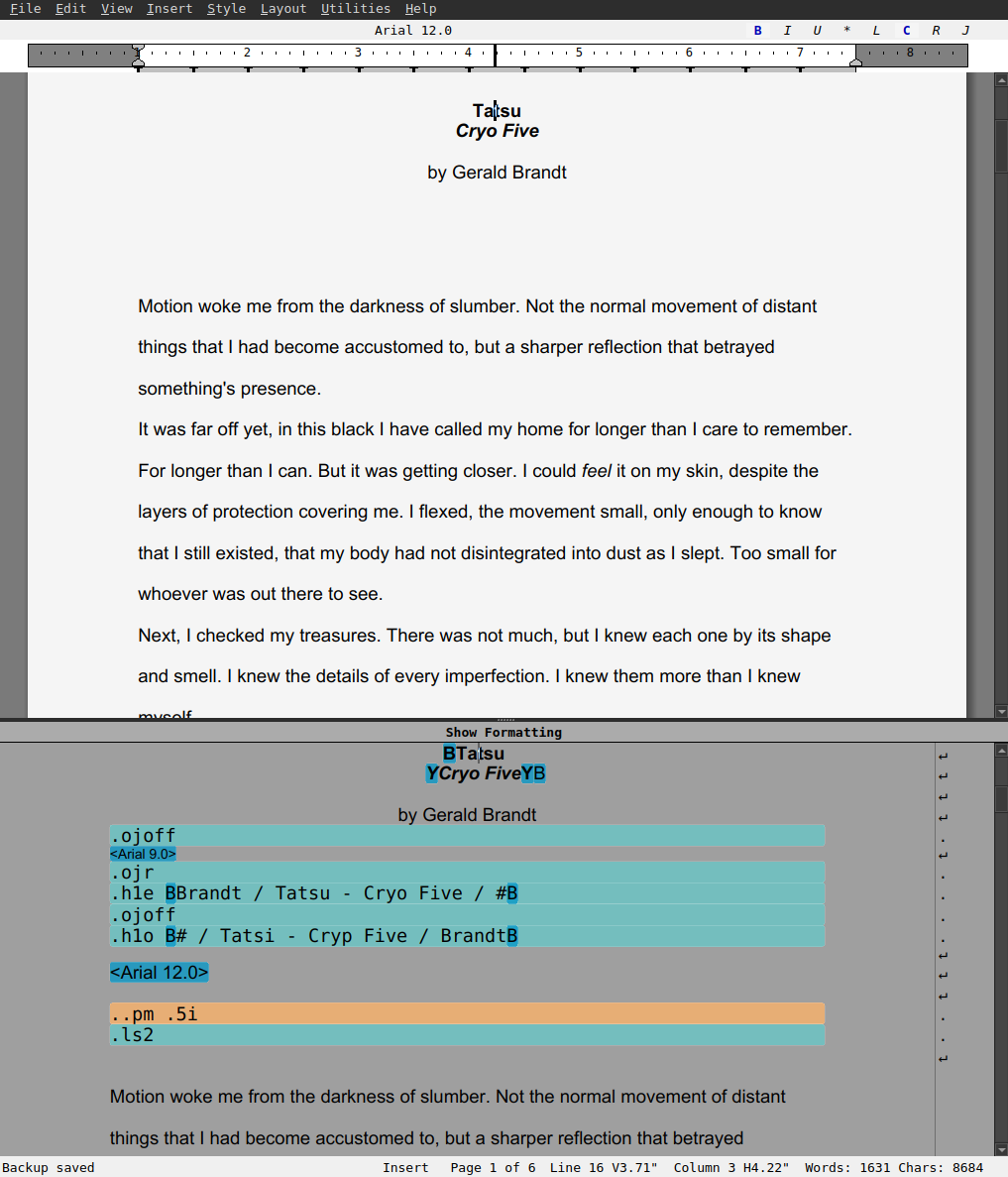
New page display mode shows documents with visual page breaks. Toggle between page and continuous modes with ^OT. A Show Formatting pane can be opened and closed with ^OD (a cheap WordPerfect Reveal Codes). Not feature complete.
Page Numbering
Page number formats: Arabic (1, 2, 3), Roman lower (i, ii, iii), Roman upper (I, II, III)
Set custom starting page number
New Dot Commands
.lh (Line Height)
.aw (Auto Word Wrap)
.op (Omit Page Numbers)
.pl (Page Length)
.pn (Page Number with format)
.pr (Printer Orientation)
.pg (Print Page Numbers)
.sr (Sub/Superscript Roll)
.cp (Conditional Page Break)
.tb (Extended Tab Stops with type prefixes)
.rr (Extended Ruler with type prefixes)
Variable Expansion
Variables now expand during display and in headers/footers:
&@&- Current date&!&- Current time&\#&- Page number&\_&- Line number&\*&- Filename&:&- Drive letter&.&- Directory&\\&- Full path
RTF Import/Export
Large improvements to RTF import and export including Unicode support, paragraph formatting, header/footer preservation, and codepage handling.
Spell Check (all platforms)
Spell check individual word ^QN
Spell check typed in word ^QO
Spell check rest of document ^QL
Top Status Bar
items are clickable to select font, set attributes, and alignment
Bottom Status Bar
Insert/Overwrite and Page number are clickable items.
Backup file changed
backup file changed from filename.ws-bak to filename-bak.ws so it can be opened easily by WordTsar
International Input
CJK (Japanese, Chinese, Korean) and Thai input method support.
Terminal Interface
Run from a shell or via ssh. Pre-alpha. There is some mouse support, but it's patchy at best. Some dialogs require mouse and keyboard for navigation and/or selection. Use at your own risk. Executable name is ws (Gui executable name is WordTsar)
- note: TUI is not designed to work over a serial interface to a terminal (such at vt-100, Wyse-60, etc)
Math Expressions in Dot Commands
Dot commands now support full arithmetic with unit-aware calculations. Use expressions like .rm 4c + 2i to mix centimeters and inches, .po 8 \* 2i for multiplication, or .lm +2c to adjust margins relative to their current value. All margin, page setup, and tab commands support math with inches, centimeters, millimeters, and points. (Limitation: addition and subtraction can mix measurements units i.e. .5i + 2c. Multiplation and Division cannot, and the dot command will be marked as an error)
Math Library
Switch from exprtk to picomath for math routines cut the binary size down by half.
Wordstar files
If a file being loaded doesn't have a known extension, WordTsar will do its best to figure out if it is a Wordstar file and load it. If that fails, it will load as plain text.
If saving as Wordstar will result in data loss, a dialog will be displayed.
Known extensions for Wordstar files are .ws, .ws3, .ws4, .ws5, .ws6, .ws7, .ws8
Bug Fixes
Multiple bug fixes, some in the ticket system on Sourceforge, most not.
Notes
.rr command
The .rr command currently assumes everthing is Courier New 12 point font, so each dash (-) represents 144 twips or 0.1 of an inch (2.54 mm). The width of a single Courier New 12 point character. As far as I can tell, Worstar 7.0D also uses 0.1 of an inch.
The .rr command has been extended with tab types. ^ is a center align tab, and > is a right align tab. For example:
.rr l----------!----------\#----------^-----------!--------\>------------r
.tb command
The .tb command has been extended with tab type prefixes. ^ is center tab, > is right aligned tab, and # is decimal aligned tab. For example:
.tb 1.0i ^2.1i 3i \>5i \#6.0i
numbers with no measurement specifier (i for inches, etc) default to colum positions where each column is assumed to be 144 twips or 0.1 of an inch (2.54 mm). The width of a single Courier New 12 point character.
../.ig command
The editor makes multiline comments look better without changing the comment itself.
Misc
Core changes and foundational work
UTF-8 in-memory document storage
Unicode version 18 support
Linux, Windows, and MacOS builds